Contacts Backup Cloud Transfer: Back Up, Restore and Move Your Contacts with Ease
Never lose a number again.
Contacts Backup Cloud Transfer is an Android app developed by FAZ Australia that keeps a safe copy of your phone's address book, so a lost, broken or replaced phone doesn't mean losing the people you need to reach.
Back up all of your contacts in one tap to your phone, Google Drive or OneDrive. Switch on auto backup, restore any earlier backup in seconds, and move your whole address book to a new phone without retyping a single number.
A clean dashboard shows your backup status at a glance, built-in tools find and merge duplicate contacts, and you can share a contact just by scanning a QR code. The app is available in 9+ languages.
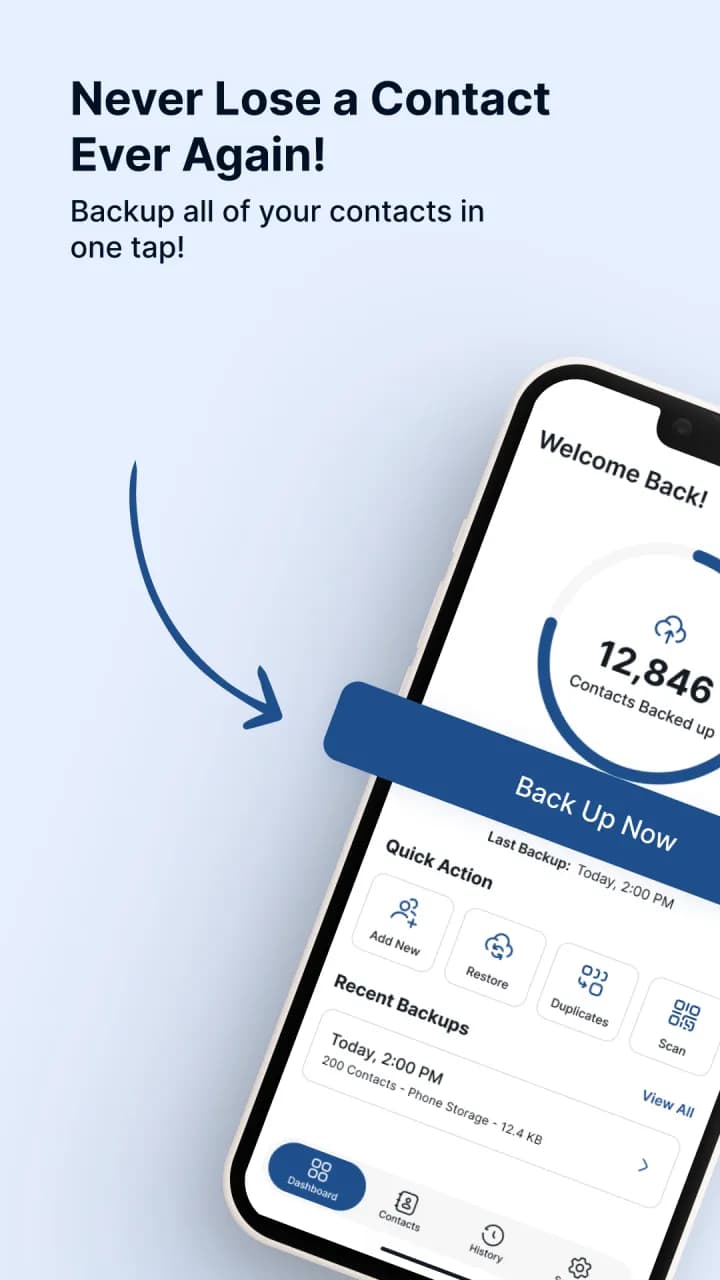
See Contacts Backup Cloud Transfer in Action
Never Lose a Contact Again
Your contact list holds years of connections: family, friends, clients, tradies and the numbers you only need once a year. Losing it to a broken screen, a stolen phone or an accidental delete is stressful.
Contacts Backup Cloud Transfer keeps a copy of your address book, including names, numbers, birthdays and email addresses, wherever you trust: on your phone, in Google Drive or in OneDrive. When you need it, restore it in seconds.
Rated 4.6 by 18,000+ Android users
Everything You Need to Protect Your Address Book
One-Tap Backup
Back up all of your contacts in one tap. It is all set and backed up in seconds.
Backup Anywhere You Trust
Choose where your backup lives: phone storage, Google Drive or OneDrive. You can change it any time.
Auto Backup
Switch on automatic backup so your contact list stays protected without creating a backup manually every time.
Restore from Any Backup
Switched phones or deleted a contact by mistake? Pick any earlier backup and bring it back in seconds.
Transfer to a New Phone
Restore your old address book on your new phone and carry on without retyping a single number.
Clean Duplicate Contacts
Find repeated numbers and merge them in a tap to keep your address book clean and organised.
Clean Dashboard
See how many contacts are backed up, when you last backed up and your recent backups, all in one glance.
Backup History
View every backup with its date, size and location, and restore or delete any of them.
Complete Contact Details
Back up the details that matter, including names, numbers, birthdays and email addresses.
Share Contacts by QR Code
No typing, no texting. Scan a QR code to save a contact in seconds.
Safe and Secure
Your contacts are kept safe and secure, and data is encrypted in transit.
Available in 9+ Languages
Use the app in your preferred language, from English and Spanish to German, Turkish and Thai.
Ready to try Contacts Backup Cloud Transfer? It’s free to download.
Protect Your Contacts in Under a Minute
Moving phones or just playing it safe? Four simple steps keep your address book backed up and ready to restore.
- Install the app
- Back up in one tap
- Switch phones
- Restore any backup
Why Choose Contacts Backup?
- Trusted by manyOver 500,000 downloads and a 4.6-star rating on Google Play.
- One tapBack up all of your contacts in seconds. No technical skills needed.
- Your choice of storagePhone storage, Google Drive or OneDrive.
- A tidy address bookFind and merge duplicate contacts.
- Moving made easySwitched phones? Restore any backup in seconds.
- Built for everyoneQR contact sharing and 9+ languages built in.

Download Contacts Backup for Android
Protect your address book today with Contacts Backup Cloud Transfer, developed by FAZ Australia. Back up in a few taps, restore whenever you need to, and move to a new phone without starting from scratch.
Frequently Asked Questions
What does Contacts Backup Cloud Transfer do?
It backs up your phone contacts in one tap to phone storage, Google Drive or OneDrive, and lets you restore any backup later, including on a new phone. It also merges duplicate contacts and lets you share contacts by QR code.
Where are my contacts backed up?
You choose: phone storage, Google Drive or OneDrive. You can change your preferred storage at any time.
How do I move my contacts to a new phone?
Back up your contacts on your old phone, install the app on your new phone, then pick your backup and restore it in seconds.
Can I recover deleted contacts?
Yes, if they were included in a backup. Choose any earlier backup from your history and restore it.
Does the app back up my contacts automatically?
Yes. Auto backup saves your contact list without you needing to create a backup manually each time.
Can it remove duplicate contacts?
Yes. The app finds repeated numbers so you can merge them and keep your address book organised.
Can I share a contact with someone?
Yes. Share a contact by QR code. No typing or texting needed, just scan and save.
Is my contact data secure?
Your contacts are kept in the storage you choose and, according to the app's Google Play data safety information, data is encrypted in transit. See the Data safety section on Google Play for full details of how data is collected and shared.
Is Contacts Backup free?
Yes. Contacts Backup Cloud Transfer is free to download on Google Play.
Is Contacts Backup available on iPhone?
Contacts Backup Cloud Transfer is currently available for Android phones on Google Play.
Who developed Contacts Backup Cloud Transfer?
Contacts Backup Cloud Transfer is developed by FAZ Australia, an Australian digital product company building mobile applications and digital solutions.
About FAZ Australia
FAZ Australia develops digital products and mobile applications designed to solve everyday problems through practical, user-focused technology. Contacts Backup Cloud Transfer, downloaded more than 500,000 times on Google Play, keeps your address book safe and portable.